
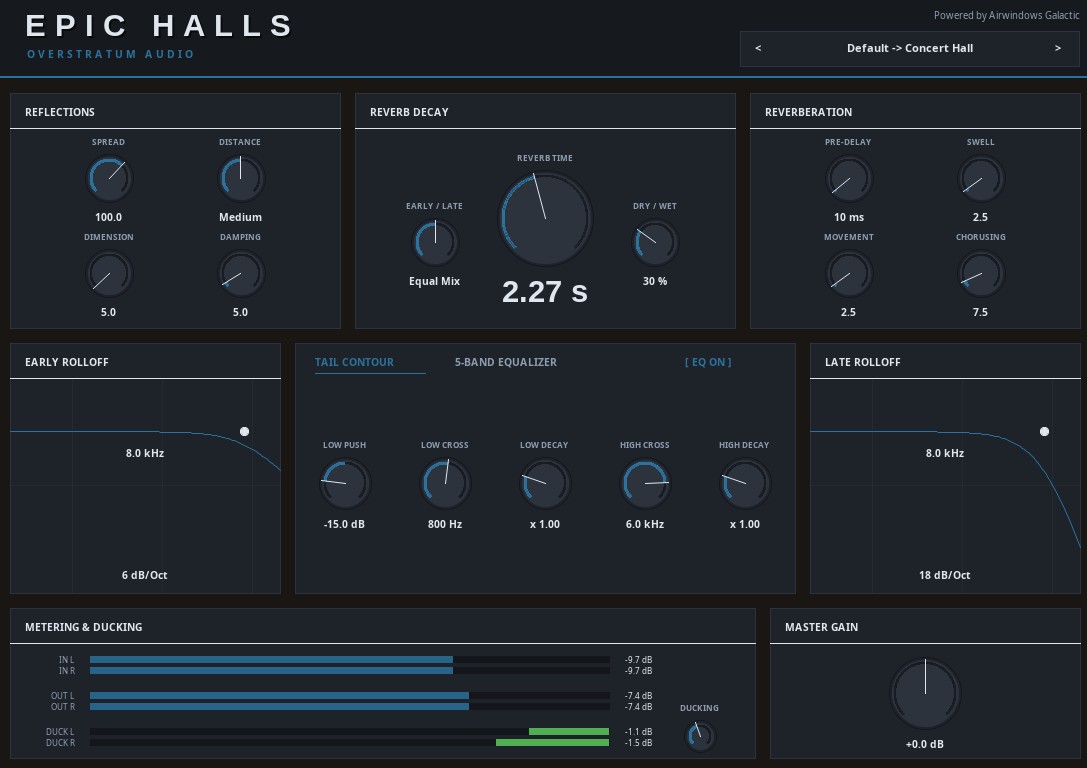
If you’re looking to bring authentic depth and breathtaking physical dimension to your mixes, you could check out Epic Halls.
Before we dive into the controls, I have to give a massive shoutout to Chris Johnson at Airwindows. The beating heart of this JSFX plugin is his phenomenal “Galactic” reverb algorithm. His brilliant, uncompromising approach to high-quality DSP provides the incredibly dense, lush foundation that makes this plugin sound so organic.
I took that flawless core engine and wrapped it in a custom, intuitive interface to give you surgical control over every spatial detail. Let’s break down exactly how to use these controls to shape your perfect room.
The Preset Menu & Navigation
Right at the top, you’ll find the preset display. I’ve meticulously crafted 150 unique spaces categorized into Halls, Studios, Cinematic, and Foley. You can use the < and > arrows for lightning-fast auditioning, or click the text to open the dynamic dropdown menu.
The checkmark easily shows you which room is currently active. The default “Concert Hall” sits right at the top so you always have a pristine starting point.
Reflections (Early Acoustic Behavior)
This section dictates the initial bounce of your audio—crucial for defining the size and physical boundaries of the virtual room.
- Spread: Widens or narrows the stereo field of the very first reflections hitting the walls.
- Distance: Alters the temporal pattern of the reflections, simulating how far the listener is standing from the sound source.
- Dimension: Scales the timing between individual echoes to make the room feel physically larger or more confined.
- Damping: Tames the high frequencies in successive bounces, replicating soft room surfaces like heavy curtains or wood paneling.
Reverb Decay (The Heart of the Hall)
Right in the center, you control the core life of the reverb tail.
- Reverb Time: The main control. Dictates exactly how long it takes for the tail to drop by 60 dB.
- Early / Late: Your mix balance between the immediate reflections (room definition) and the lingering tail (the wash).
- Dry / Wet: Blends your unprocessed signal seamlessly with the final reverberated wet signal.
Reverberation (The Late Tail)
Shape the complex, lingering wash of the hall here.
- Pre-Delay: Holds back the reverb onset by milliseconds to keep your source material punchy and upfront.
- Swell: Adjusts the attack of the late tail, controlling how fast the reverb builds to maximum density.
- Movement: Introduces low-frequency breathing and modal density to keep the tail from sounding static.
- Chorusing: Adds lush modulation to the late reflections, perfect for thickening strings or synths.
Frequency Control: Graphs, Contour & EQ
The top middle section is your surgical toolkit for keeping the mix clean.
- Rolloff Graphs: Drag the points to set precise high-pass and low-pass filtering before the reverb even hits. Right-click the text to change the slope from a gentle 6 dB/Oct to a steep 24 dB/Oct.
- Tail Contour Tab: A masterclass in decay shaping. Use the crossover knobs to split the frequencies, then dial in the multipliers to make bass linger longer or treble vanish faster. The “Low Push” knob uniquely accents the low-end impact right at the onset of the reverb.
- 5-Band Equalizer Tab: An analog-style console strip (HPF, Low Shelf, Mid, High Shelf, LPF) to shape the final wet signal perfectly into your track.
Metering & Ducking
Keep your gain staging flawless and your mix uncluttered. The robust LED meters provide instant visual feedback for your Input and Output levels, but the real star here is the built-in 1-Knob Ducking feature.
Instead of setting up complex parameter modulation or external sidechain routing in your DAW, simply dial up the Ducking knob. It automatically analyzes your dry input and seamlessly dips the wet reverb tail out of the way during loud passages. This is absolutely perfect for keeping lead vocals, dialogue, or drums upfront and intelligible while still maintaining a massive, epic sense of space behind them.
The dedicated Duck L/R meters give you precise, analog-style visual feedback of the gain reduction. The custom LED scale shifts dynamically from a safe green, into orange, and up to a bright red (max -7 dB) so you know exactly how aggressively the ducking is working. Finally, the Master Gain knob lets you effortlessly compensate for any overall volume changes.