
Dynamic EQ v2
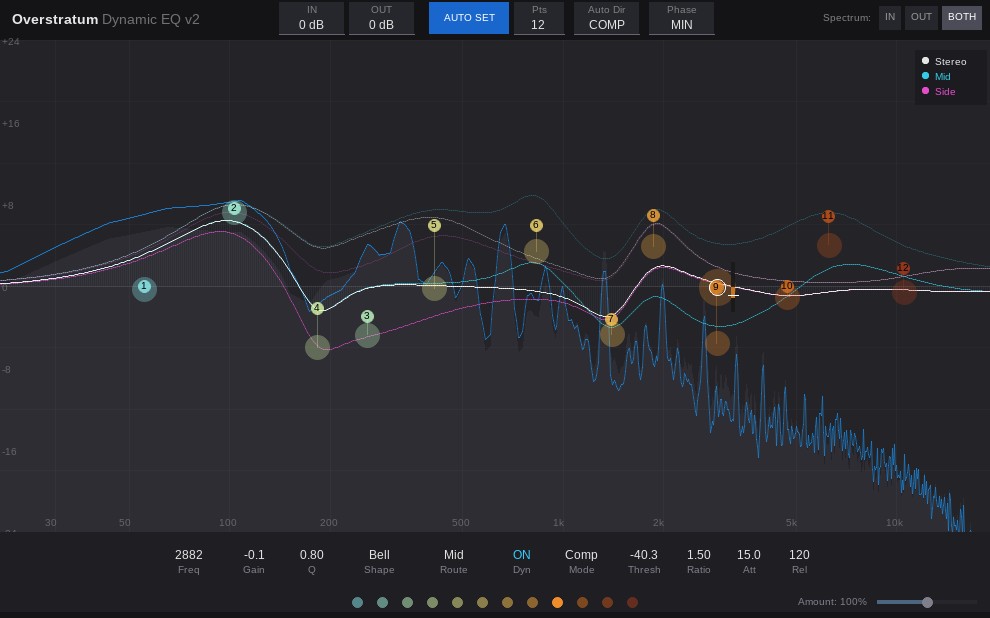 Let’s be honest: mixing is complicated enough, and your tools shouldn’t get in the way. Sometimes you just need an EQ that is precise when fixing a problem, but broad when shaping a bus. That’s why we built the Overstratum Dynamic EQ v2. It’s designed to be a reliable, daily-driver dynamic EQ that handles regular resonance control as well as analog-style high-end boosts.
We also included an Auto Set feature that takes the behavior of different frequencies into account. Let’s take a look under the hood.
How the Auto Set Engine Works
Many auto-EQs simply hunt for the loudest peaks, which often means putting most of the bands into the high-hats and ignoring the rest of the mix. We took a different route here.
- Logarithmic Zoning: When you hit Auto Set, the engine slices the frequency spectrum (from 80 Hz up to 10 kHz) into evenly spaced logarithmic zones. The first band is anchored as an 80 Hz Low Shelf, and the last is a 10 kHz High Shelf. The bell filters are distributed in between. The zones prevent overlapping bands or clustering in a single frequency area.
- Peak Detection: Inside each zone, the algorithm looks for a resonating peak. If a zone is relatively flat, the engine just parks the node in the middle of that zone and waits for your input.
- Frequency-Dependent Thresholds: Bass energy behaves differently than high-end transients. The auto-thresholds account for this difference in crest factor. They apply a frequency-dependent offset (+1.0 dB in the lows, scaling up to +14.0 dB in the highs) to aim for a consistent 1 to 1.5 dB of gain reduction or expansion across the spectrum.
- Auto Dir (COMP / EXP): A toggle that sets the overall behavior. Need to tame harshness? Set it to COMP. Want to emphasize the transients of a drum bus? Flip it to EXP (Expand).
Core EQ Features
If you prefer to dial things in manually, every band offers standard controls.
- Filter Types & Q: You get the usual Bells, Shelves, Filters, and Notches. The Q-factor ranges from 0.1 to 20.0. When you use Auto Set, the plugin adapts the Q to match the width of the detected peak.
- Mid/Side Routing: Every single band can be independently set to Stereo, Mid, or Side. They sum additively, meaning if you boost the Mid channel and cut the Stereo channel at the same frequency, the EQ curves interact naturally.
Dynamics Section
Every EQ point has its own dynamics module to react to the incoming audio.
- Threshold & Ratio: The threshold ranges from -60 to +12 dB. The ratio handles standard compression, and you can drop it below 1.0:1 for upward expansion.
- Attack & Release: Timing controls (Attack: 0.1ms – 200ms, Release: 1ms – 2000ms) let you shape the envelope of the dynamic reaction.
Phase Modes: MIN vs. NAT
You can toggle the phase behavior depending on your workflow and CPU limits.
- Phase: MIN (Minimum Phase): This is the zero-latency standard mode. It’s light on the CPU, making it suitable for tracking or using across multiple channels.
- Phase: NAT (Natural Phase): Digital EQs tend to “cramp” near the Nyquist frequency when boosting extreme highs. Flipping this on activates a 2x oversampling engine with anti-aliasing filters to prevent this. Your high-frequency shelves and bells will open up, mimicking the curves of analog gear. The UI curve updates to show the new shape, while the spectrum analyzer stays synced.
Workflow & Interface
- Spectrum Analyzer: We used an overlapping ring-buffer to keep the visual feedback stable, whether you’re looking at your IN signal, your OUT signal, or both.
- Global EQ Amount: There’s a horizontal slider at the bottom right to scale your overall EQ curve. Pull it down to ease off all bands simultaneously, or push it up to 200% to exaggerate your moves. Double-click to reset to 100%.
- Solo Mode: Right-click and hold any node to hear what that specific band is doing. The solo mode respects your M/S routing, meaning if you solo a “Side” band, you will only hear the side signal.
Download Overstratum Dynamic EQ v2
Looking for a straightforward tool to handle your equalization? Download the Overstratum Dynamic EQ v2 below.
We built this EQ to help streamline your workflow. The Auto Set engine scans your audio and places dynamic bands where your track needs them. It aims to control resonances or add expansion while keeping the signal sounding natural. If you want to avoid digital cramping in the high frequencies, switch on the Natural Phase mode to apply 2x oversampling and open up the top end. Whether you are fixing a snare drum, tweaking a vocal, or doing Mid/Side bus processing, this plugin gets the job done with a clean, stable interface.
Drop it into your session, hit analyze, and see how it fits your mix.