
Transforming static loops and beats into complex, syncopated rhythms shouldn’t require bloated software or a degree in mathematics. Overstratum Stutter v1 is a lightning-fast, sample-accurate JSFX plugin engineered exclusively for REAPER.Designed with a deterministic chunk-playback engine, it eliminates the L/R phasing and Haas-effect drift that plague traditional delay-based choppers. Instead, it delivers rock-solid, DRM-free, and CPU-efficient rhythmic manipulation.
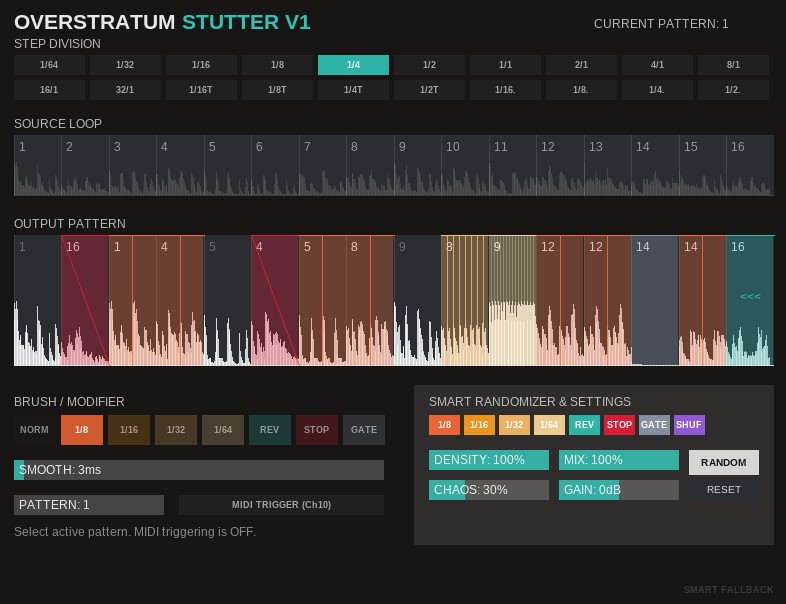 Whether you are crafting intricate IDM drum fills, pumping EDM build-ups, or modern hip-hop vocal chops, this plugin provides instant musicality through an intelligent motif-generating randomizer and absolute modifier timings.
1. Step Division (The Grid)
The Step Division dictates the size of your “drawing canvas.” It determines the musical length of a single step within the 16-step pattern.
Click any value from 1/64 up to 32/1 (including triplets and dotted notes) to set the grid.
Double-click any division button to instantly reset the grid to the default 1/4 note setting.
Note: Changing the Step Division resizes the pattern window, but it does not alter the speed of your stutter modifiers. A 1/16 repeat will always remain a 1/16 repeat, ensuring your grooves stay locked.
2. Source Loop & Output Pattern
The interface is split into two main visual grids:
Source Loop (Top): Displays the incoming audio buffer. The highlighted block shows which slice of the original audio is currently being captured.
Output Pattern (Bottom): Your sequencer. Here you determine which captured slice is played back at what time, and what modifier is applied to it.
Drawing: Left-click and drag up or down on a step to change which slice of the audio it plays. Right-click a step to instantly reset it to a straight 1:1 playback.
3. Brushes / Modifiers
Select a brush to paint specific rhythmic effects onto your sequence.
NORM: Standard forward playback.
1/8, 1/16, 1/32, 1/64: Absolute stutter repeats. These chop the step into the selected note value and repeat the initial slice segment.
REV: Plays the step in reverse.
STOP: Simulates a turntable slowing down to a complete halt, utilizing a musically smooth parabolic braking curve.
GATE: Mutes the step with a lightning-fast envelope to prevent zero-crossing clicks.
4. The Smart Randomizer & Settings
The heart of Overstratum Stutter v1 is its musical motif engine. Instead of pure digital chaos, clicking RANDOM generates structured, usable ideas while protecting your downbeats.
Modifier Pools: Toggle the buttons (x4, x8, REV, STOP, etc.) to allow or forbid specific effects during randomization.
SHUF (Shuffle): When active, the randomizer will rearrange the order of the audio slices. When inactive, the slices remain chronological, and only the rhythm/modifiers are randomized.
Density: Controls the probability of steps being altered. Keep it low (e.g., 15%) for subtle end-of-bar fills, or high (80%) for total rhythmic destruction.
Chaos: Determines how far audio slices are allowed to jump from their original position when SHUF is active.
RESET: Instantly clears the sequence, reverting to a clean, unmodified loop.
5. Global Sound Shaping
Smooth (ms): Controls the release tail of your cuts. The engine uses an asymmetrical “Punch & Tail” crossfade. A 2ms attack guarantees hard, click-free transients, while this slider dictates how long the previous slice rings out underneath the new one.
Mix: Standard Dry/Wet balance.
Gain (dB): Output volume driving into an integrated soft-clipper to tame harsh transient peaks safely.
Double-click any slider to return it to its default state.
6. Live MIDI Triggering
Overstratum Stutter v1 features 12 independent pattern slots.
Toggle MIDI TRIGGER to enable live switching.
Route a MIDI track (Channel 10) to the plugin and press notes C1 through B1 to instantly jump between your 12 programmed sequences.
SMART FALLBACK: If you trigger a stutter early in your DAW timeline before the plugin has buffered enough audio, the “Smart Fallback” indicator will pulse. The engine intelligently bypasses the stutter temporarily to prevent silence, ensuring smooth offline renders and live playback.