
Here is a comprehensive product overview and changelog highlighting the journey of the Overstratum Auto M/S Gain Rider from its early iterations to the powerful v1.4 release.
The Overstratum Auto M/S Gain Rider is a specialized, fully custom-drawn GFX mastering tool designed to intelligently balance Mid/Side loudness dynamically. By continuously monitoring the relationship between the Mid and Side channels using K-weighted loudness detection, it ensures consistent spatial balance across complex mixes without compromising transient punch or mono compatibility.
The Core Innovation: The 3-Band Perfect Split
One of the most significant architectural leaps from the earliest versions to the current release is the implementation of a 3-Band Perfect Reconstruction Crossover (LOSER logic).
While initial concepts focused primarily on a single broadband M/S structure, multi-band processing unlocked unprecedented surgical control:
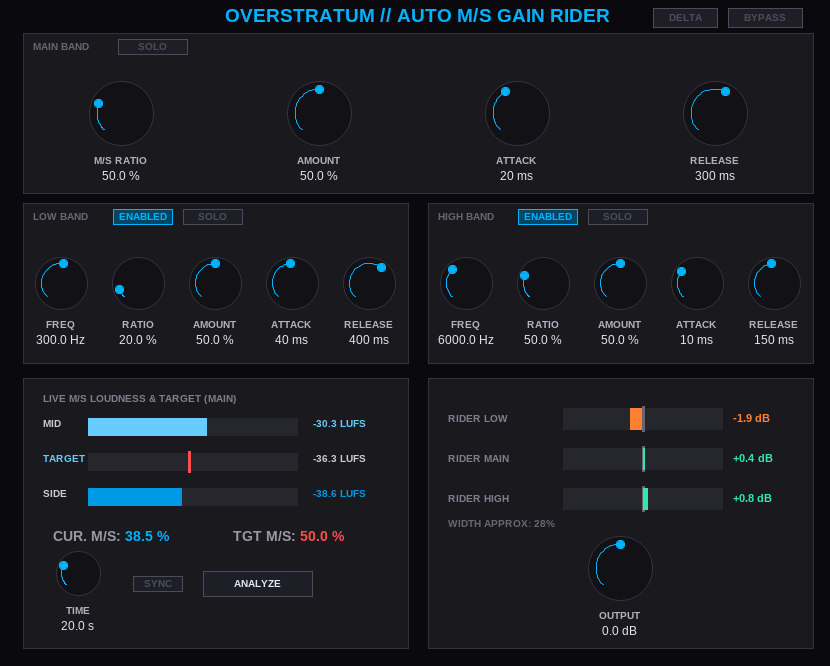
Low Band (Independent Freq & Riders): Heavy low-end elements often suffer when processed broadband. The Low Band allows engineers to set an independent crossover (80Hz to 500Hz) with custom attack, release, and M/S ratio targets, ensuring bass frequencies remain anchored and phase-coherent in mono while letting sub-elements breathe.
Main Band (The Core Focus): Operating between the low and high crossovers, the Main Band handles the primary body of the mix, featuring independent ratio, amount, and dynamics timing.
High Band (Air & Brilliance): Controlled via an upper crossover (1kHz to 16kHz), the High Band manages top-end width and sparkle separately, allowing for precise control over high-frequency spatial spread.
Band Activation & Soloing: Every band can be independently enabled, bypassed, or soloed instantly via the custom GFX interface, providing instant feedback on how specific frequency ranges contribute to the overall stereo image.
From Early Builds to Version 1.4
The plugin has undergone major workflow and analytical upgrades to make it a seamless studio companion:
From Peak Detection to Integrated Analysis (“Analyze” Button):
Early Versions: Relied entirely on instantaneous or short-term peak reactions.
Version 1.4: Introduced a dedicated Analyze button. Instead of getting thrown off by a brief, overly wide transient, the plugin now calculates a true mathematical average (Integrated LUFS-S energy) over a user-defined window (5 to 60 seconds). It automatically configures the M/S Ratio targets to match your reference source accurately.
Workflow & Sync Improvements:
Playback sync is now disabled by default for absolute freedom during offline rendering and dry runs, while still supporting project synchronization when toggled on.
Monitoring & Control Suite:
Added dedicated Delta (listening to difference only) and global Bypass toggles right in the header for quick A/B testing.
Refined Defaults & UI Polish:
Amount defaults have been optimized to a balanced 50% across all bands, with double-click-to-default behavior fine-tuned. The interface layout has been tightened up to eliminate text overflows and ensure optimal visual ergonomics.
Get it here: JSFX