
If you are looking for the ultimate tool to speed up your mixing workflow in REAPER, the newly updated Balance Analyzer v1.2 is here. This custom JSFX plugin takes the guesswork out of spectral balance, dynamic range, and stereo imaging by giving you crystal clear, real-time visual feedback. Whether you are checking your master bus or dialing in individual stems, this analyzer bridges the gap between technical metering and creative mixing decisions.
What Balance Analyzer Does for Your Mix
At its core, Balance Analyzer acts as your all-in-one mixing companion. It features True Peak metering to prevent digital clipping, a Peak to Short-term Ratio (PSR) meter to monitor the dynamic punch of your tracks, and standard LUFS Short-term and Integrated loudness readouts.
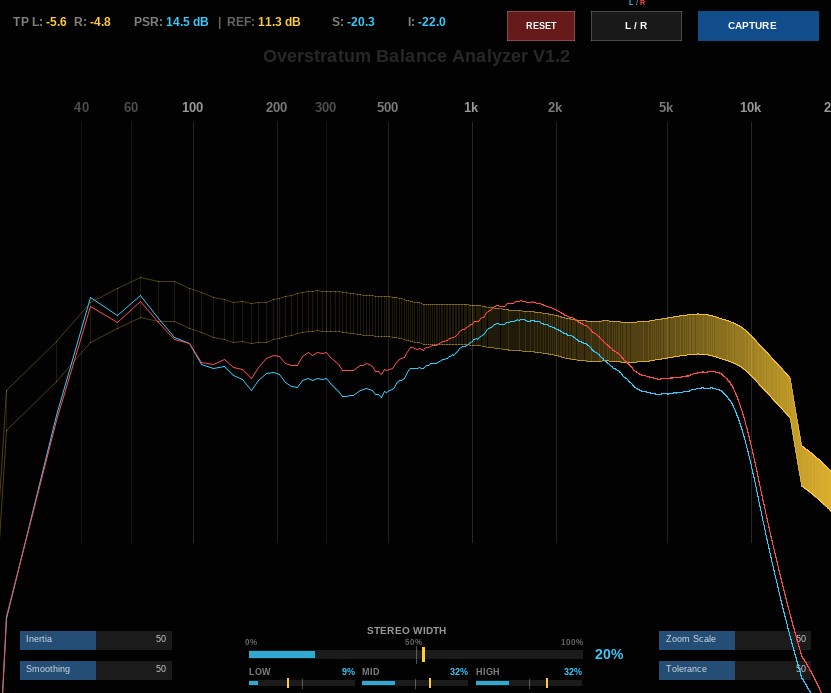
At the bottom of the interface, a dedicated Stereo Width and phase correlation meter breaks down your low, mid, and high frequency bands so you can spot mono-compatibility issues instantly.
Best of all, the Capture function lets you record the spectral profile of any commercial reference track and save it directly into your REAPER project as a green target band, making curve matching and reference mixing easier than ever.
What Has Changed Since Version 1.1
Version 1.2 introduces major workflow enhancements and deep audio analysis upgrades requested directly by users.
First, the graphical user interface now features a fully proportional scaling engine. When you resize or shrink the plugin window, all parameters, buttons, and text scale smoothly without ever overlapping or breaking the layout.
Second, a complete built-in manual has been added directly into the plugin via informative mouseover tooltips for every single element, from the peak meters and capture buttons to the Inertia and Smoothing sliders.
Finally, the visualization engine has been heavily upgraded to include dedicated View Mode switching. You can now seamlessly toggle between standard Stereo, Left/Right, and Mid/Side modes. In Mid/Side mode, both the mid and side signals utilize independent centering algorithms, ensuring your side information never drifts off-screen and giving you a pristine, matching-EQ-style comparison view for spatial mixing.
Update to v1.2 today inside REAPER and take complete control over your mix balance and stereo image!