
The Overstratum Matching EQ v2.0 is an advanced REAPER JSFX plugin designed to analyze the spectral profile of a reference audio source and precisely transfer its tonal fingerprint onto your working track.
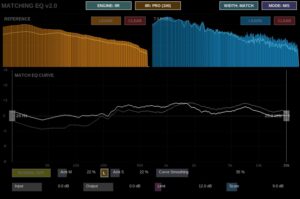
Main Controls and Sections
- Learn Source and Learn Target: Capture buttons that analyze the frequency spectrum of your reference audio and your target audio respectively, computing the spectral difference curve between the two profiles.
- Match Amount: Controls the intensity of the frequency correction curve applied to your audio, ranging from subtle spectral nudging to full profile transfer. In Mid/Side or Dual L/R processing modes, this splits into independent amount controls with a link toggle.
- Curve Smoothing: Adjusts the resolution and curve tightness of the EQ profile to prevent harsh resonant peaks and maintain a musical, natural frequency transition.
- Processing Modes: Switches between Stereo, Mid/Side, and Dual Left/Right configurations to manage stereo width and frequency distribution independently, featuring an additional Wideness mode for M/S balance.
- Processing Engine: Allows you to toggle between IIR (Min-Phase) and FFT (Lin-Phase) processing engines. The IIR mode utilizes cascaded biquad filters for zero-latency processing and high CPU efficiency, complete with a node resolution selector (ECO, PRO, MAX), while the FFT mode provides linear-phase spectral matching with selectable resolution (Standard 4k or HQ 16k).
- Min and Max Frequency: Defines the active frequency boundaries for the matching process, adjustable directly via interactive frequency handles on the EQ curve display.
- Input and Output Gain: Manages pre-EQ and post-EQ level adjustments ranging from -24 to +24 dB.
- Limit and Scale: Controls the maximum allowed boost or cut (Limit) and the visual grid display scale in dB (Scale).
- Bypass and Clear: Bypasses the EQ processing entirely or clears the captured reference and target profiles.
Typical Matching Workflow
- First, route your reference track and target track appropriately. Click the Learn button under Reference while playing the reference audio, and then click Learn under Target while playing your own material.
- Choose your preferred Processing Engine depending on whether you need zero-latency minimum-phase IIR filtering or linear-phase FFT spectral matching.
- Select your Processing Mode (Stereo, Mid/Side, or Dual L/R) to determine how the stereo field is handled.
- Adjust the Match Amount and Curve Smoothing to dial in a natural, musical curve rather than an aggressive, over-processed replica.
- Drag the Min Freq and Max Freq handles on the curve display to restrict the matching to the desired frequency range.
- Finally, fine-tune your Input and Output Gain levels, use Bypass to A/B your results, and render your matched track.
Download the Matching EQ v2.0 hiere: Reaper JSFX Tools