
If you work with orchestral mockups, you already know the drill. You buy a massive, expensive sample library, and it comes out of the box with beautifully scripted CC1 (Dynamics) and CC11 (Expression) controls. You ride the modwheel, and the brass sections swell realistically, shifting from a mellow hum to a bright, brassy roar.
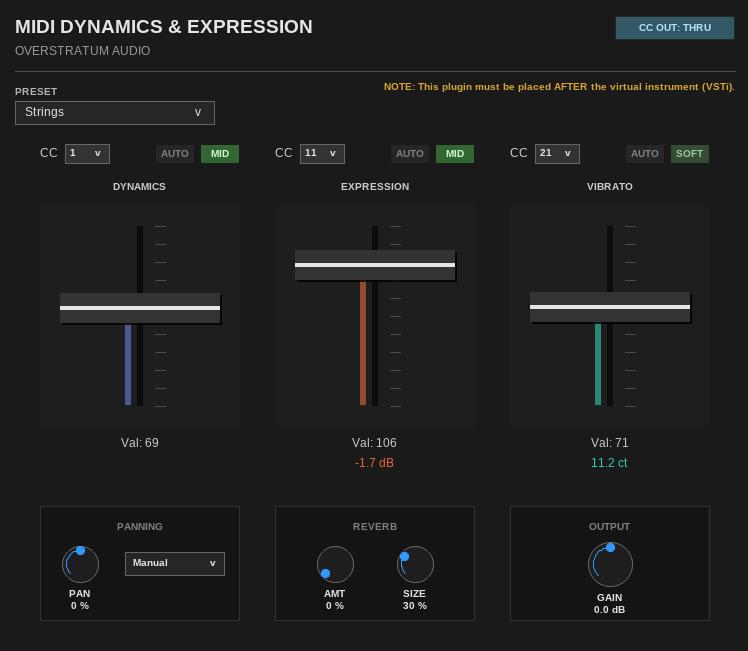
But what about the simpler tools? A lot of us rely on lightweight, DRM-free sample sets or basic virtual instruments that only trigger a single velocity layer. They might sound great on a single note, but trying to play a realistic crescendo with them is impossible because they lack dynamic timbre variation. That’s exactly why the Overstratum MIDI Dynamics & Expression plugin exists.
It sits in your REAPER FX chain right after your virtual instrument. It intercepts your MIDI CC data and uses it to drive a custom DSP engine that fakes the complex behavior of high-end libraries.
How It Works
Instead of simply turning the audio up and down, the plugin applies a dynamic multiband EQ that reacts to your modwheel. Playing softly rolls off the high frequencies and tames the sound; pushing the modwheel opens up the filter and adds presence, simulating the acoustic energy of an instrument being played harder.
Here is a full breakdown of the controls so you know exactly what is happening under the hood.
The Header Controls
- MIDI CC Output Toggle (Top Right): By default, this is set to THRU, meaning your raw MIDI data passes through the plugin untouched. If you switch it to SLIDERS, the plugin blocks the original CCs mapped to the faders and instead outputs the generated CC values from the plugin itself—useful if you are using the plugin’s “Auto” movement features and want to record that automation.
- Preset Dropdown: Choose the instrument family you are processing (Strings, Woodwinds, Brass, Choir). This alters the internal crossover frequencies and EQ curves to match the acoustic profile of that specific group.
The Main Sections (Dynamics, Expression, Vibrato)
Each of the three main pillars has the exact same routing layout: a CC assignment dropdown, an Auto-Movement toggle, an Intensity toggle, and a main fader.
- Dynamics (CC1 – Modwheel): This controls the timbre and subtle volume scaling (-10 dB to 0 dB). Moving this fader adjusts a hidden multiband EQ.
- Expression (CC11): This handles pure volume attenuation (-60 dB to 0 dB) without affecting the tone. It’s perfect for fading instruments into complete silence or shaping phrases within a dynamic layer.
- Vibrato (CC21): Utilizing a sample-accurate delay-line algorithm, this modulates the pitch. It includes a built-in envelope so the vibrato fades in naturally on sustained notes. The algorithm is powered by the great open-source Vibrato DSP by Geraint Luff.
Section Controls:
- CC Dropdown: Select which incoming MIDI CC drives the fader.
- Auto Button: Don’t have a MIDI controller handy? Click this to switch from manual CC control to randomized, algorithmic movement (SLOW or FAST). The sliders will move automatically to humanize sustained chords.
- Intensity Toggle (OFF / SOFT / MID / HARD): Determines how aggressively the effect is applied to the audio signal.
The Footer (Space and Width)
- Panning & Seating Presets: A true stereo panner. Instead of guessing where instruments sit on a stage, click the dropdown menu to select traditional orchestral seating positions (e.g., Violin, French Horn, Percussion), and the plugin will snap to the correct stereo field location.
- Reverb (AMT & SIZE): A built-in algorithmic reverb powered by the open-source Airwindows Galactic DSP. It provides a lush, infinite-style tail that glues dry samples together.
- Output Gain: A final trim stage (-12 dB to +12 dB) to gain-stage the processed signal before it hits your mixing bus.
A Quick Note on Routing
Because this is an audio effect that listens to MIDI, it must be placed in your FX chain immediately after the VSTi/Sampler. If you place it before the instrument, it has no audio to process. But: You can use it as a randomizer for your CC. Be creative!
It’s just a simple, effective tool to get more mileage out of basic samples. Drop it on a track, assign your CCs, and just play.